


How agents break traditional access-management models
AI agents do not create a new access problem. They make an existing one much harder. Agents act autonomously, across more systems and at machine speed. They often rely on broad permissions, standing access and static credentials that were never designed for this kind of activity.
An agent does not have to be compromised to cause harm. A well-functioning agent can misunderstand intent, choose the wrong course of action or use available permissions beyond what the task actually requires.
Multiple identities, no traceability
Every agent action involves at least the originator and the agent. Often, the agent inherits permissions and assumes the identity of its originator, making it difficult to determine what was done and by whom.
Too much standing access for too long
Originators and agents often have broad permissions or static credentials that exceed the task and remain available long after they are needed.
Lack of enforcement, accountability breakdown
Agent workflows span multiple control points. If identity and policy enforcement are not carried across the action chain, agents can take rogue actions and create unintentional failures, making audit impossible.
Four questions matter: who’s acting, on whose behalf, what can they do and what happened?
Requirements for agentic access control
Blended identity and provenance
Preserve the originator, acting agent and delegated context together so every action remains attributable across the full action chain.
Runtime tool authorization
Determine which tools, capabilities or services the agent can use as the task is executed, with policy deciding which actions can proceed autonomously and which require approval.
Task-specific access scope
Give the originator and agent only the permissions required for the current task and only as long as needed.
Why choose P0 Security for agentic runtime access control?
Discover agents and what they can access
- Find AI agents, including shadow agents, the identities they use, the tools and systems they can reach and the privileges available to them.
- Surface risky access paths, standing privilege and unmanaged access before they become runtime problems.
Control every action at runtime
- Evaluate each requested action using the full context behind it, including the originator, agent, task, action and resource.
- Grant only the privilege required for the approved action, when it is needed and for as long as it is needed.
Prove what was done and why
- Capture the complete action chain from originator through agents, tools and target systems.
- Preserve the identity, policy decision, approval, privilege granted, action and outcome for audit, investigation and compliance.
How P0 enforces policy end to end
Runtime authorization cannot stop at the gateway. P0 controls whether an agent can invoke a tool, then carries identity and policy context into the target system to control the actual privilege available there.
Preserve the blended identity
Keep the originator, acting agent and delegated context together throughout the task so downstream decisions remain tied to who initiated the work and what was authorized.
Apply policy to every action
Evaluate the originator, agent, task, requested action, target resource and current conditions to determine whether the action is allowed, denied or requires approval.
Go beyond tool-level control
Control whether an agent can invoke a tool, then provision task-specific, short-lived privilege in the target system using its native access controls. Remove that access when the task or approval window ends.
Preserve the complete action record
Connect the originator, agent, task, tool call, policy decision, approval, privilege granted, target system and outcome across the full action chain.
Architecture at a glance
One control plane. Two deployment layers.
P0 combines centralized identity and policy management with runtime enforcement inside your environment.
P0 Controller
This SaaS layer provides the centralized identity, policy and control layer across agents, users and machines. It combines continuous identity and access discovery with centralized policy management, giving P0 a shared view of who and what has access, how that access is granted and the policies that govern what each identity can do.
P0 AI Gateway
These components run inside your environment and enforce policy between agents, tools and target systems while carrying approved access into the systems where the action occurs:
- Auth Server: Federates with the enterprise identity provider and establishes the identity and delegated context behind the request. It binds the originator and acting agent to the request and supports short-lived target-system credentials when approved access requires target-system privilege.
- Access Proxy: Intercepts governed tool calls before they reach the downstream MCP server, API or workflow. It maps inbound identity and session context to ephemeral credentials and permissions so the target system can enforce authorization using its native controls.
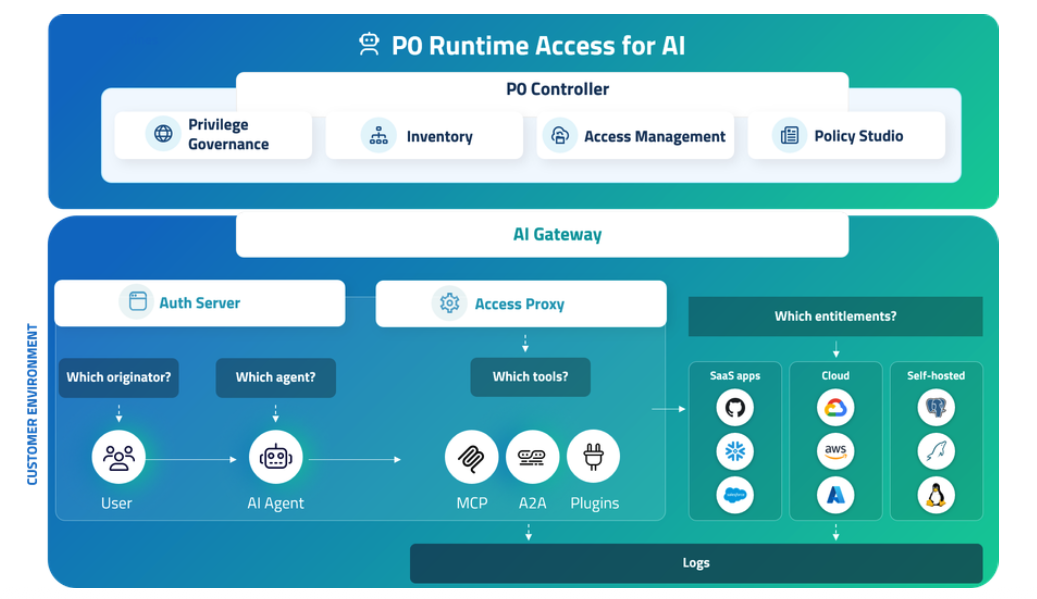
How P0 fits into your environment
Components of P0’s Runtime Access platform for AI
| Layer | Includes | Function |
|---|---|---|
| P0 Controller | Privilege Governance | Governs privileged access, exceptions and access lifecycle across identities. |
| Inventory | Discovers agents, users and machines along with privileges, access paths and identity relationships. | |
| Access Management | Manages access requests, approvals, grants and revocation. | |
| Policy Studio | Defines the policies used to evaluate and control access at runtime. | |
| AI Gateway | Auth Server | Establishes the originator, acting agent and delegated identity context for the request. |
| Access Proxy | Intercepts governed actions and maps approved access to short-lived credentials and permissions enforced in the target system. | |
| Integrations | Prebuilt integrations and SDK | Connect P0 to identity, cloud, SaaS, infrastructure and agentic systems, with an SDK for custom integrations and enforcement points. |
| Target systems | SaaS, cloud and self-hosted | Enforce approved entitlements using native access controls. |
Getting started
P0 works with your existing identity, agent and MCP infrastructure. Deployment connects those systems to P0 and defines how agent access should be authenticated, authorized and monitored.
- Deploy the P0 AI Gateway in your environment.
- Connect P0 Auth Server to your existing identity provider.
- Register agents and MCP servers.
- Define roles, permissions and approval policies.
- Route agent calls through the gateway and monitor activity in P0.