

For AI | Agentic use cases
IAM service account expert

Developers are starting to use agents as an easier way to understand IAM. Instead of manually tracing roles and policies, someone can ask an agent questions like, “What can this service account access?” or “Why is this permission failing?”
We have worked through this pattern with customers using user-initiated IAM agents. The interesting part is that the answer or action should depend on who is asking, not just what the agent itself can technically do.
Where access gets tricky
IAM agents often act on behalf of a person, but the agent may run under a broader service account or application identity. If the user context disappears, the agent’s permissions can become a privilege bypass.
A developer who cannot directly modify a production service account should not be able to make that same change indirectly through an agent. Policy has to preserve both the user and agent identities, then evaluate the requested action against the user’s actual scope.
The agent’s permissions should never replace the permissions of the person using it.
Example actions and policies
| Action | Example policy |
|---|---|
| Inspect a service account’s permissions | Allow authenticated developers to inspect resources they are authorized to view |
| Explain why access is failing | Allow read-only troubleshooting within the requester’s normal scope |
| Add a missing permission during an incident | Allow only if the requester is on call for the affected service and the change is within incident scope |
| Remove a permission | Require the requester to have the appropriate IAM role and, where required, an active change or incident |
| Grant a broader role than the task requires | Deny because the change exceeds the approved scope |
| Delete a service account | Require elevated approval or a separate break-glass policy |
| Reuse write access after the incident closes | Deny once the incident or temporary grant is no longer active |
Example policy
Originator: Developer is currently on call for payments-api
Agent: IAM Service Account Expert
Request: Add a missing Storage permission to payments-prod-sa
Context: PagerDuty incident INC-4821 is active for payments-api
Allow only when:
- The requester is currently on call for the affected service
- The requester is authorized to manage access for that environment
- The agent is approved to make scoped IAM changes
- The target service account belongs to the affected service
- The requested permission is relevant to the incident
If allowed, grant temporary permission for that specific IAM change only.
How enforcement works
The user starts by asking the IAM agent a question or requesting a change. P0 keeps the user and agent identities linked from the start, so the requester remains part of the authorization context rather than disappearing behind the agent credential.
The request is then classified based on what the agent is trying to do. Read-only access can be handled differently from a permission-changing operation, but both are evaluated against the same core context: the user’s role, the target resource, ownership, environment and purpose of the request.
When the action changes permissions, P0 can also check whether the user is on call, whether a matching ticket exists or whether some other approval condition has been met. Policy then determines whether that specific user-agent-resource combination is authorized for the requested action.
If approved, P0 grants only the scoped access required for that IAM operation. The agent performs the allowed read or change, temporary privilege expires when the task or approval window ends and the full action chain is recorded, including the user, agent, resource, decision, approval and result.
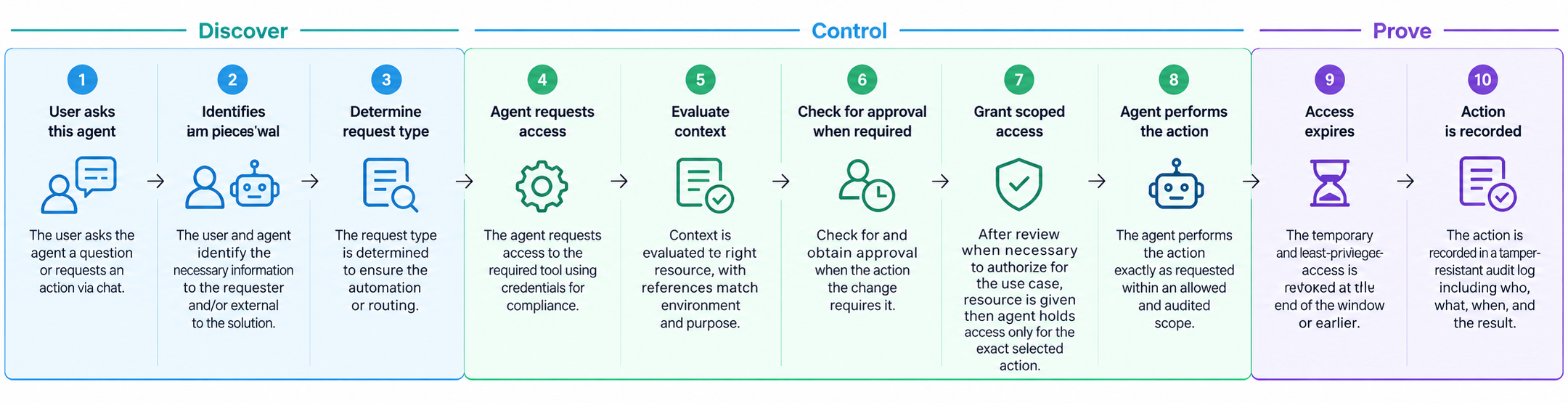
P0 keeps the user attached to every IAM action
P0 preserves the user and agent identities together, evaluates the requested IAM action in context and grants only the access required for that specific task.
Read and write operations can follow different policy paths, higher-risk changes can require ticket or on-call context and temporary privilege is removed when the work is complete.
Every action remains attributable from the original user request through policy decision, approval, access and outcome.