

For AI | Agentic use cases
Coding and SRE agents

Coding agents are moving from helping developers write code to interacting with repositories, cloud infrastructure and production systems. At the same time, SRE teams are deploying headless agents that can respond automatically to incidents.
Both may eventually call the same Kubernetes clusters, cloud APIs or databases, but the authorization context is different.
- Coding agents usually act for a person
- Headless SRE agents may act for a workload or incident with nobody at the keyboard
Where access gets tricky
For a user-initiated coding agent, the risk is inherited privilege. A developer may have broad access because they are expected to exercise judgment, but the coding agent should not automatically receive every permission available to that developer.
For a headless SRE agent, the problem changes. There may be no human originator at all. The authorization decision has to reflect the workload that launched the agent, the active incident and the remediation the agent has been approved to perform.
Example actions and policies - user-initiated
| Action | Example policy |
|---|---|
| Inspect cloud resources | Allow when both the engineer and approved coding agent are authorized for the target |
| Modify an approved repository | Allow only if the engineer has write access and the agent is approved for code-write operations |
| Change production infrastructure | Require a matching ticket or approved change, then grant short-lived access to the affected resources only |
| Delete production infrastructure | Deny by default or require elevated approval |
| Access a production resource outside the engineer’s scope | Deny even if the agent’s credential technically permits it |
Example policy
Originator: Engineer is in Production-Engineering
Agent: Claude Code
Request: Restart payments-api in prod-payments
Context: Jira CHG-1842 is active
Allow only when:
- The engineer is authorized for the production environment
- The engineer has access to the target namespace
- Claude Code is approved to perform restart actions
- The Jira ticket matches the requested resource
- The request occurs within the approved change window
Otherwise, deny or require additional approval.
How enforcement works
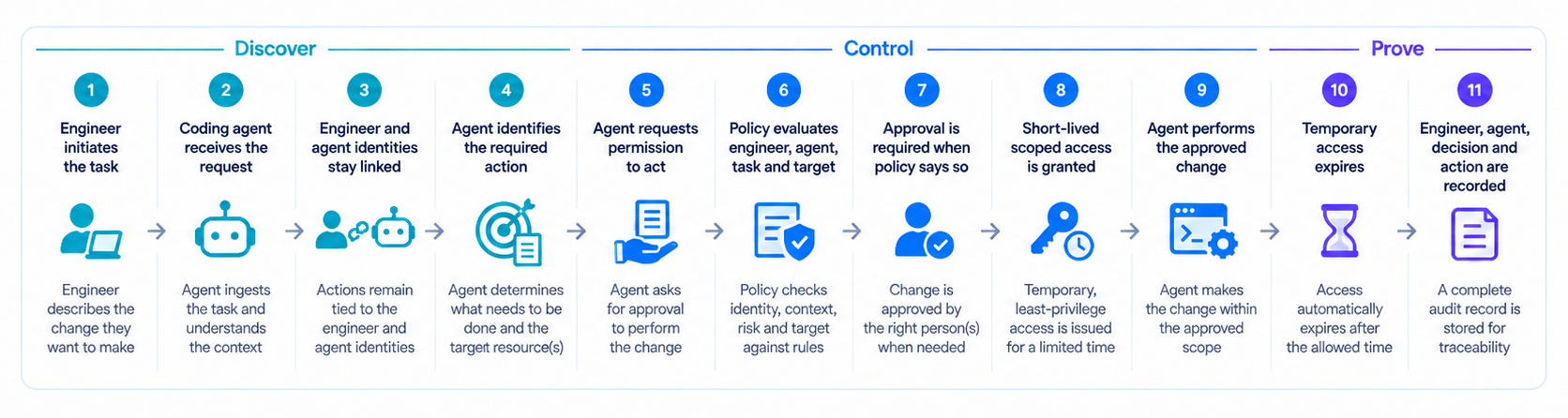
Example actions and policies - headless SRE agent
| Action | Example policy |
|---|---|
| Respond to an active PagerDuty incident | Allow the approved workload and agent to perform the predefined remediation |
| Restart the affected Kubernetes workload | Allow only for the cluster, namespace and service associated with the incident |
| Modify an unrelated resource | Deny because it falls outside the active incident |
| Keep elevated access after remediation | Deny once the action or incident ends |
Example policy: headless SRE agent
Trigger: PagerDuty incident INC-4821
Workload: Approved Kubernetes remediation job
Agent: SRE remediation agent
Request: Restart failed workload in prod-payments
Allow only when:
- The workload identity is registered and approved
- The incident is active
- The target matches the affected service
- The requested action is part of the approved remediation playbook
Grant short-lived access to the affected namespace and resource, then expire it when the remediation completes or the incident closes.
How enforcement works
A PagerDuty incident or other approved trigger starts the workflow, and a registered workload launches the SRE agent without a person actively operating it. P0 preserves the workload identity, incident context and acting agent so the request remains tied to the event that caused the agent to act.
When the agent identifies a remediation, policy evaluates whether the workload is approved, the incident is still active, the target matches the affected service and the requested action is part of the approved remediation playbook. Higher-risk or exceptional actions can still be escalated for review.
If allowed, P0 grants short-lived privilege only to the affected cluster, namespace, service and approved remediation. The agent performs the action, access expires when the remediation completes or the incident closes and the full outcome is recorded for audit.
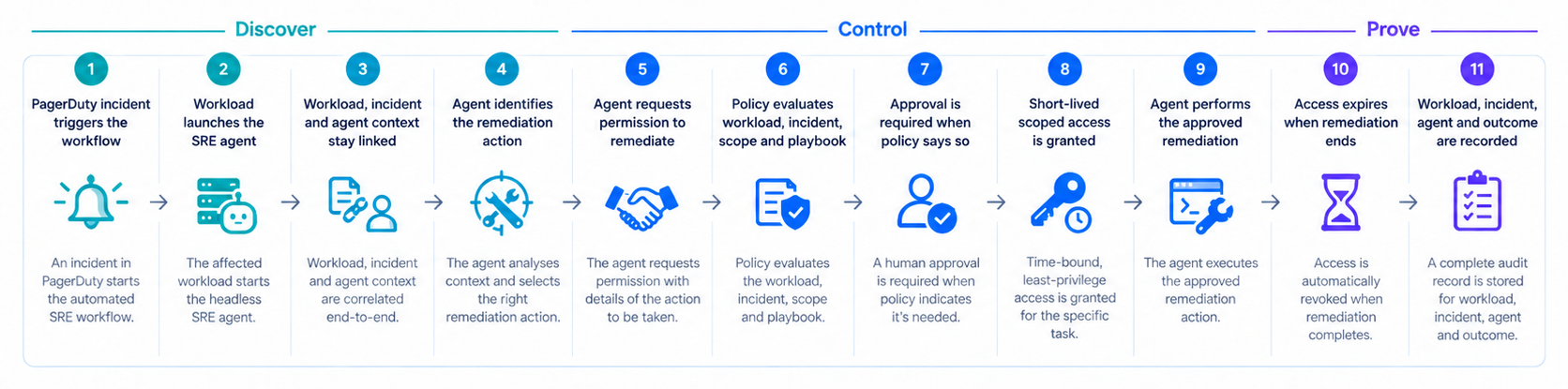
P0 keeps every action tied to its origin
For user-initiated coding agents, P0 preserves the engineer and agent together through the authorization decision. For headless SRE agents, it preserves the workload, incident and remediation context instead. In both cases, policy limits access to the task at hand, grants short-lived privilege only when needed and records the full chain for audit.